Eurocode · NL, BE, UK, DE, IT annexes · AISC 360-16 · ACI 318-19
Structural calculations
you can check,
line by line.
3D FEM, 2D frames, beams, a concrete and steel toolbox and parametric Excel models, to Eurocode. Every formula and clause is in the report, so you can recheck any number with a pocket calculator. Pay only for the hours you calculate.
Free download · first hour free · €100 welcome credit when you register · then pay per use · no credit card · Windows
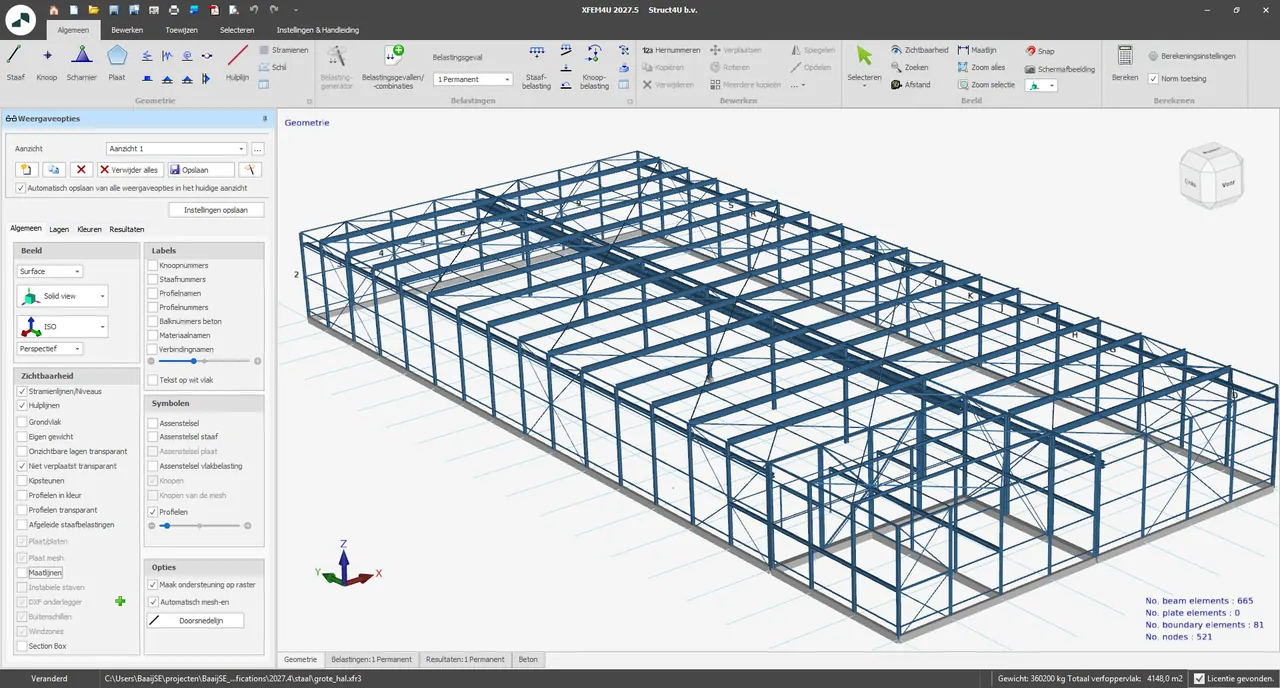
One prepaid credit works in every application, so you can start small.
What do you need to calculate?
Start from the job, not the product name. Four Windows applications and one Excel workbook, all a free download. Every application writes the same transparent report, straight into Word if you like.
A beam in steel, concrete or timber
XBeam2D€12/hA 2D frame, portal or truss
XFrame2D€12/h3D frames, plates and walls
XFEM4U€15/hSections, columns, punching, connections
XConstruct€12/hParametric models from Excel
XSpreadsheetsExcel (.xlsm)Models from code
PythonStruct4U.pyResults in your Word report
Word add-inincludedHow-to answers from the manual
AI Assistantfree · €9 · €29/month- Which program do I need?
Facts you can check, not adjectives.
- 1,000+Users
- 9Countries
- 5National annexes
- 20+Releases per program
- 7Software languages
- €4,000Annual cap
Sources Release notes per program, November 2022 to August 2026. Price list October 2026. Users and countries: Struct4U, 2026.
The reference beam, an IPE 300 in S235 spanning 6 m, as it appears in the report.
No black box. Every formula, every clause, every value.
The report shows the formula as it appears in the code, the values that went in and the result with its unit. Your reviewer can follow it, and you can recheck it by hand.
6.2.5Bending moment
EN 1993-1-1 §6.2.5Cross-section class 1 (Table 5.2): the plastic resistance applies.
ClauseGlobal sway imperfections to EN 1993-1-1 §5.3.2(3)a are applied automatically in both directions, so every ULS combination is calculated twice.
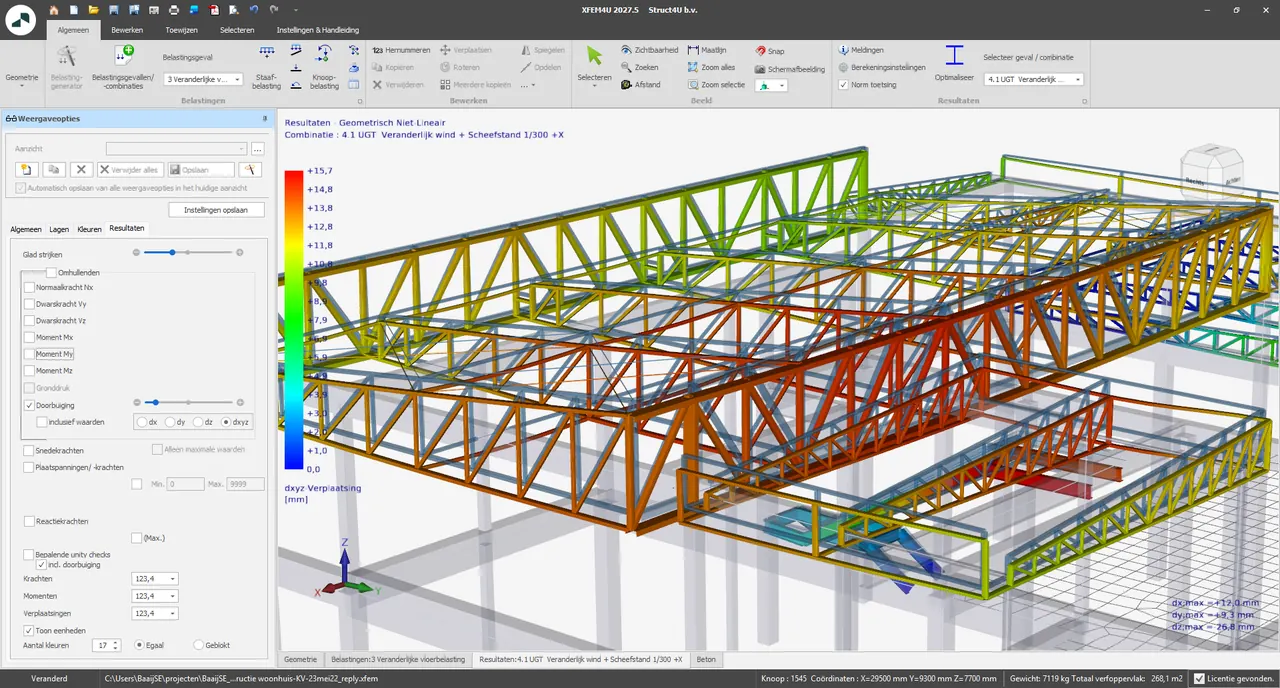
XFEM4U: 3D frames, plates and walls. Frames second-order, plates linear.
Steel, concrete and timber in one 3D model. With steel or timber checks switched on, frames are always analysed geometrically non-linear, with global imperfections applied automatically. Plates and walls are analysed linearly. Every member check is in the report, clause by clause.
| Elements | Beams and columns in steel, concrete and timber; plates, slabs and walls |
|---|---|
| Analysis | Frames: first order (GL) or second order (GNL), always GNL with steel or timber checks. Plates and walls: linear |
| Codes | EN 1990 · 1991 · 1992-1-1 · 1993-1-1, -1-2, -1-8 · 1995-1-1 · AISC 360-16 · ACI 318-19 · NPR 9998 |
| Annexes | NL · BE · UK · DE · IT |
| Exchange | IFC, Excel and XML; Tekla import, IDEA StatiCa export and DXF export with Premium |
| Price | €15/h pay-per-use, or the Advanced licence at €2,218 a year |
Break-even€1,770 ÷ €12 = 147.5 h
€2,218 ÷ €15 = 147.9 h
≈ 12 hours a month.
All prices excl. VAT. Price list October 2026.
Pay for the hours you calculate. Never more than €4,000 a year per computer.
Buy prepaid credit, billed per minute: €12/h for the 2D programs, €15/h for XFEM4U. Registering gives you €100 of credit as a welcome gift, and because you pay in advance, there’s never an invoice afterwards.
Pay-per-use is cheaper by €618 a year. Break-even is at about 12.3 hours a month.
| Licence | Basic 2D | Advanced 2D + 3D | Premium |
|---|---|---|---|
| Single usermax. 2 workstations | €1,770 | €2,218 | €2,688 |
| Networkper simultaneous user | €2,632 | €3,293 | €3,696 |
Your calculation in your Word report. Always current.
The Word add-in puts the report of any Struct4U application into your own Word document as a linked block. Change the model and Word marks the block out of date; one click updates it. No screenshots, no retyping.
- 1
Drop the model
Drag an XFEM4U, XFrame2D, XBeam2D or XConstruct model onto the Calculations pane. The report goes in at the cursor as a linked block.
- 2
Change the model
Each block keeps a fingerprint of its model. When the model changes, the block is marked out of date.
- 3
Update
Update recalculates the block in place; Update all does every out-of-date block. Nothing is ever refreshed silently.
 Watch the demo0:51
4.2 Steel floor beam B1
Checked to EN 1993-1-1. The results below are linked to the model.
| Beam | IPE 300 · S235 · 6.00 m |
| Bending §6.2.5 | UC 0.55 |
| Shear §6.2.6 | UC 0.15 |
| Deflection L/250 | UC 0.50 |
The sample reports print the applied standards with their edition and national annex, and the consequence class.
Don’t take our word for it. Check the report.
Struct4U reports are written to be rechecked. A reviewer can follow every step without opening the model, and you can re-key any number.
Standards named
Each report names the codes it applied, with edition, national annex and consequence class.
Inputs with their source
Section properties, material strengths and partial factors, each with its unit.
Formula, then values
Every check prints the formula with its equation number, fills in the values and gives the result.
Unity check per member
A table lists each member with its combination, the article and the unity check.
The highlights are ours.
Engineers who use it. In their own words.
As an (independent) small consulting firm, I have been using Struct4U software since 2018. It is very user friendly software, both input and changes a very fine visual display. Experienced the ongoing development of this software in recent years and a lot of custom requests have been incorporated. The intermediate design output works very easily, is clear and you can see fairly quickly what part needs modifications. The final output is very complete and gives full printouts of all formulas. A very good quality-price ratio; I myself have a complete year package and with that you have a comprehensive software package. I can recommend it to everyone.
Ing. Ruud van der BreggenBouwadvies Van der Breggen B.V. As a small consulting firm, we were looking for an affordable option for simple and more complex FEM calculations and ended up with Struct4U. Both the fee system (per hour when used) but also the software really appealed to us. Due to the extremely high (intuitive) ease of use during input and the good output capabilities, both for the FEM software and the material toolboxes, all packages score highly with us. With an alert, knowledgeable and responsive support, it is a strong tool for the structural engineer.
ir. F.D.H. SchleipfenbauerIngenieursbureau Middelhuis en Schleipfenbauer From the start of Ingenieursbureau Van Wijngaarden in 2018, I have been working with Struct4U software. The calculation software has evolved considerably from this period and is pleasant to work with. The helpdesk is easily accessible, responds quickly and listens carefully to the customer’s needs.
ing. J.C. van WijngaardenIngenieursbureau Van Wijngaarden
An independent Dutch company, since 2014. Struct4U is based in Rotterdam. The programmers and structural engineers who build the software also answer your questions.
Questions engineers ask first.
9.1What does 5 hours a month cost?
9.2Which codes and national annexes are covered?
9.3Can my reviewer follow the output?
9.4Is it Windows only?
9.5Is it free for students?
Try it on your next calculation.
Download free and calculate for an hour straight away. Register in the program for €100 of welcome credit. After that, top up or buy a licence.
Free download · first hour free · €100 welcome credit when you register · then pay per use · no credit card · Windows