There is a new release available of our 3D program XFEM4U 2025.1.
Click here to install the new release (2025.1.01).
On release notes you will find an overview of all new features and improvements
The most important new features:
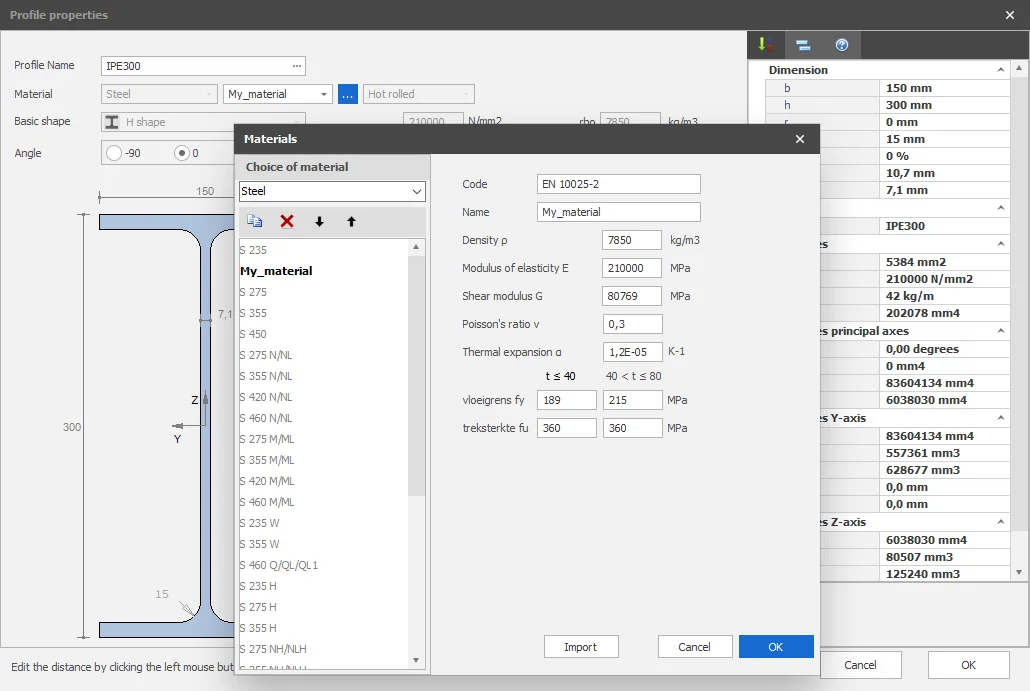
1. New User defined materials
It is now possible to enter own materials (steel, concrete, rebar and timber). How? Very simple. Copy one of the standard materials. Give it its own name and adjust its properties. It is not possible to modify the default Eurocode materials but you can define and add your own material. Then you can use this material in other programs as well. The materials are saved in an XML file so you can put that on the network and share the materials database with your colleagues.
How does it work? Watch the demo here.
2. New Navigation Cube
In AutoCad Revit, the View Cube at the top right of the screen lets you quickly switch views by clicking on it. XFEM4U now also features a similar Navigation Cube. You can use the right mouse button to show or hide the Navigation Cube.
How does it work? Watch the demo here.
3. New Construction parametrically using Microsoft Excel
It is possible to create a construction parametrically using Microsoft Excel. You can define your own parameters in Excel. From Excel an XML is generated that is also directly loaded into XFEM4U. So you see the result immediately and you can start calculating that construction right away.
4. Improvement Error report
Of course, a software error should never occur. Let there be no misunderstanding about that. If an unexpected software error does occur, an error report is now automatically generated. And you can send this report very easily (with one click on the send button) including your input and preferably your explanation to us so that our Struct4U support team can investigate it. That way you help us make the software even better.
To stay up to date with the latest developments you can follow us on Linkedin.