There is a new release available of our 3D program XFEM4U 2027.4.
Click here to install the new release (2027.4.01).
On release notes you will find an overview of all new features and improvements
The most important new features:
1. New Fire Resistance of Steel Structures
A highly requested feature is now available!
In recent years, many users have asked us to add the ability to assess the fire resistance of steel structures within XFEM4U. We set to work, and the result is impressive: a powerful, fast, and fully transparent calculation of the fire resistance of any steel structure.
Insights in seconds
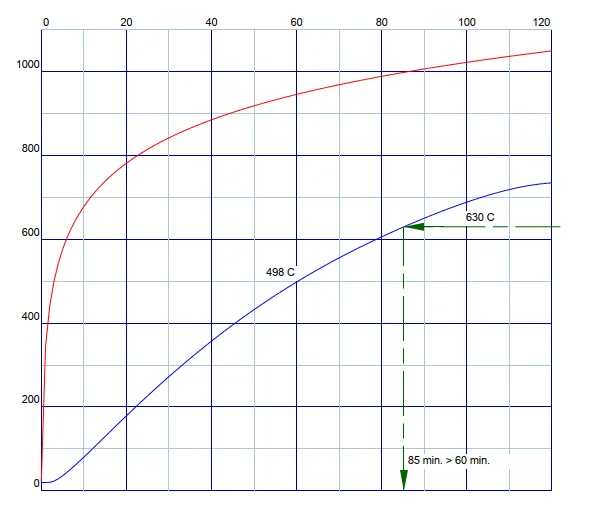
XFEM4U iteratively calculates the critical steel temperature for each member and then determines the fire resistance according to applicable standards.
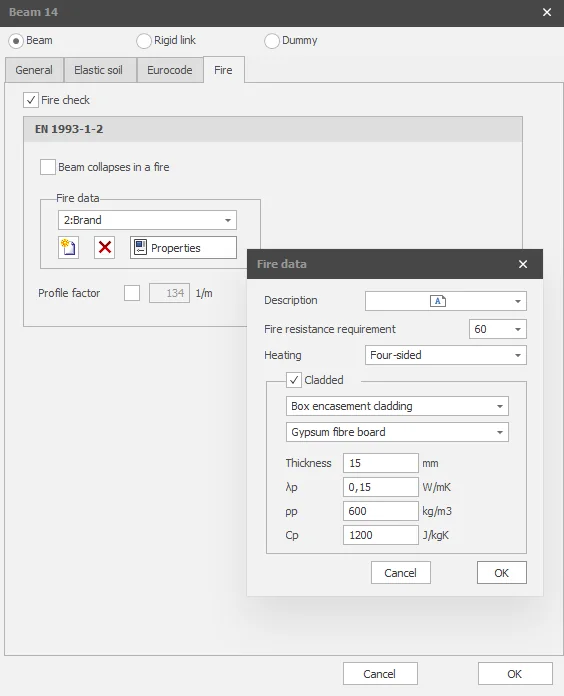
You can analyze both unclad and fire-resistant clad steel sections. For the cladding, you can easily choose between profile-following or box encasement systems. In addition, an extensive library is included with the most commonly used fire-resistant materials and various coating thicknesses.
More Than Just Temperature
During a fire, a steel section continues to heat up. As the temperature rises, both the yield strength and the modulus of elasticity decrease. As a result, the load-bearing capacity changes continuously.
XFEM4U calculates this process entirely iteratively. For each member, the temperature evolution over time is determined, after which the system automatically identifies when the member loses its load-bearing capacity. This point in time—expressed in minutes from the moment the fire starts—represents the member’s fire resistance.
This complete calculation is performed extremely quickly, even for large structures.
Maximum Flexibility
Not every beam needs to remain intact in a fire situation. That’s why you can easily specify which beams are allowed to fail in the event of a fire. This allows you to simulate realistic fire scenarios and assess the robustness of the structure.
No Black Box—Just Complete Transparency
As you’ve come to expect from XFEM4U, we don’t just show you the final result.
The entire calculation is transparent. You can follow it step by step:
- how the temperature of each member evolves;
- how the material properties change;
- how the critical steel temperature is determined;
- and how the fire resistance is ultimately calculated.
This allows you not only to use the results but also to verify and justify them. Transparency is central to XFEM4U—including with this new functionality.
Another powerful addition to XFEM4U
With just a few mouse clicks, you can now also verify the fire resistance of your steel structure. Fast, reliable, fully transparent, and integrated into the familiar XFEM4U environment.
This saves you time, keeps you in control of the calculation, and provides you with all the information you need to confidently support your design.
Curious about how easy it is? Click here for a demo.
2. New IFC Export for BIM
Your structural model is immediately available in a BIM environment.
Structures are increasingly being designed as part of an integrated BIM process. That’s why XFEM4U has been enhanced with an IFC export feature, allowing you to easily share your structural model with other BIM software.
With the click of a button, you can export the entire model to the open IFC format. This allows your steel, concrete, or wood structure to be imported directly into virtually any BIM application. This ensures that the structural engineer, architect, and contractor are always working with the same model information.
To stay up to date with the latest developments you can follow us on Linkedin.