Contents
What the video shows
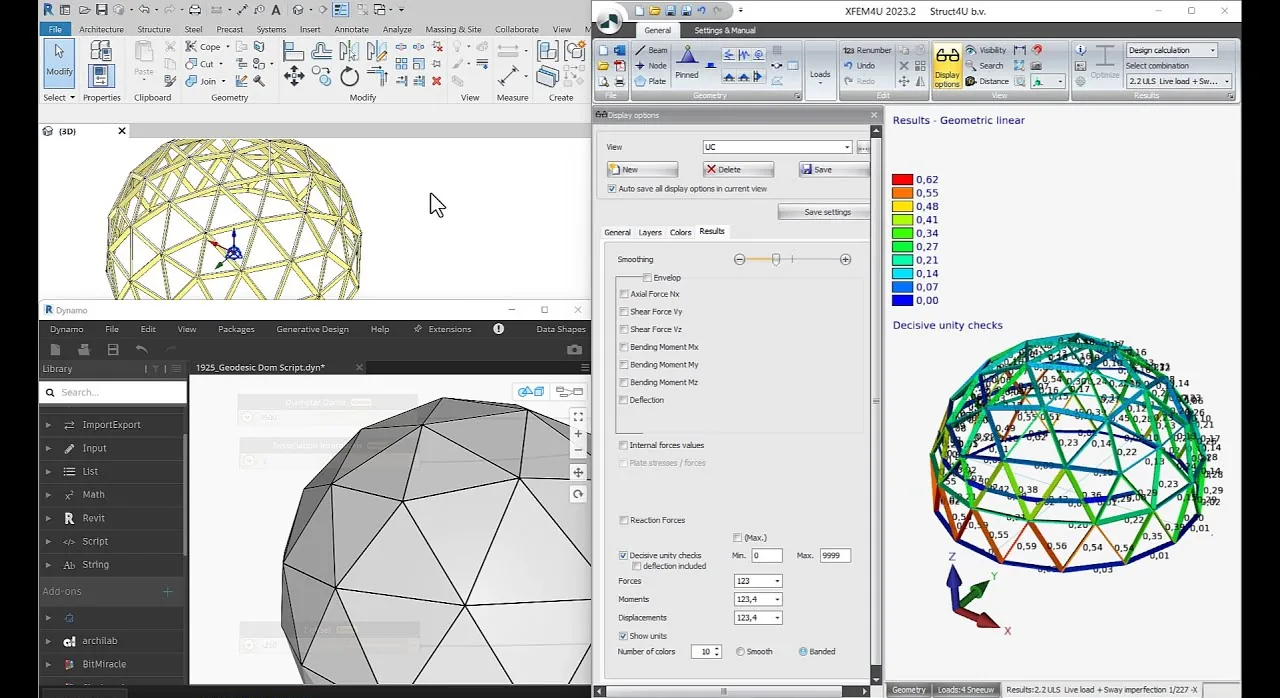
The cover of the video puts three programs side by side: the dome in Autodesk Revit (top left), the Dynamo script that generates it (bottom left), and XFEM4U 2023.2 with the result of the calculation (right).
| In the video | |
|---|---|
| Program | XFEM4U 2023.2 |
| Material | timber |
| Geometry | generated with a Dynamo script in Autodesk Revit, then exported to XFEM4U |
| Result on screen | the governing unity check per member, from 0.00 to 0.62 |
| Load combination | 2.2 ULS: live load with a sway imperfection of 1/227 in the −X direction |
| Self-weight | 859.1 kg, from the status bar |
The highest unity check on screen is 0.62, so in this combination every member has spare capacity. The sway imperfection is part of the load combination: XFEM4U applies it in both directions, so every ULS combination is calculated twice. How sway imperfections are set up is explained in second-order analysis and imperfections.
From script to analysis model
A geodesic dome is a typical job for a script: many members, all slightly different, on a sphere. In this project the geometry came from Dynamo inside Revit and was exported to XFEM4U for the analysis and the checks.
Models can also come in through XML, which is how structures made in Python, VBA or Excel reach XFEM4U and XFrame2D; see XML in XFEM4U and XFrame2D.
About this page
The video does not name the engineer, the client or the location, so this page does not either. The numbers above are read from the screen in the video.